I was recently browsing online for cool tech gadgets to simplify my daily life and that’s when I found the Flipper Zero. Now, I’m no cybersecurity expert, but when I first heard about the Flipper Zero, I pictured it as just another flashy gadget for hackers and cybersecurity pros. Terms like “penetration testing,” “signal spoofing,” and “RFID emulation” sounded straight out of a Sci-Fi film – not exactly something I’d need! But, naturally, curiosity won out. After watching a few videos and exploring its features, I finally got my hands on one. What I discovered was amazing: the Flipper Zero isn’t just for elite coders. It’s like a powerful, pocket-sized Swiss Army knife of tech that even someone as non-technical as me can use for fun and practical applications. Explore the world of radio frequency (RF) hacking, digital access, and security testing with this incredible device! Learn more about the Flipper Zero’s capabilities and see how it can enhance your everyday tech experience.
Public Service Announcement !!

THIS IS ONLY FOR EDUCATIONAL PURPOSES. WHEN USING TECH LIKE THIS IT IS CRUCIAL TO UNDERSTAND THE POTENTIAL RISKS IT COMES WITH. PLEASE USE RESPONSIBLY ON YOUR OWN DEVICES !!
So, What Is the Flipper Zero?
At its core, the Flipper Zero is a small, portable multi-tool designed for interacting with the digital world around us. It resembles a playful Tamagotchi with a pixelated dolphin mascot on the screen, but don’t let its cute design fool you. The device is packed with functionality: it can read, store, and emulate RFID cards, scan radio frequencies, clone remote controls, interact with NFC tags, and even act as a universal infrared (IR) remote, which I will show you later. Initially, these features sounded intimidating. But diving into the basics, I quickly realized the Flipper Zero is beginner-friendly if you start small. You don’t need to be a cybersecurity expert or hacker to make it useful—just a little curiosity and the right guidance.
What I Learned (Without Any Coding Knowledge)
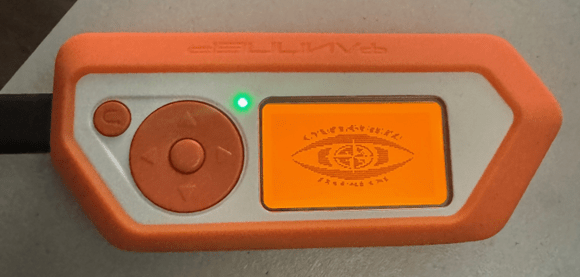
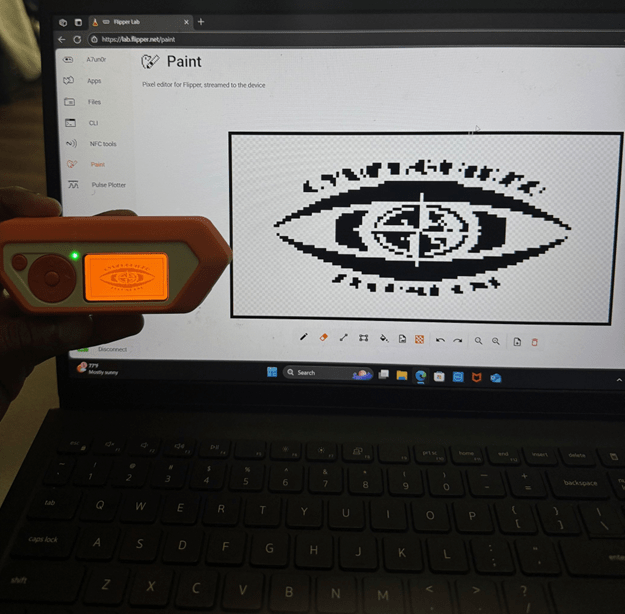
One of the first Flipper Zero tools I tried was customizing the screen to display my company’s logo. While this isn’t a technical hack per se, it was a cool little modification I felt was pretty neat. To get started, I plugged my Flipper Zero into my computer and navigated to the official Flipper Zero Lab. There, I found the Paint module. This feature lets you draw images to transmit or, if you aren’t a pro like me, upload an image to be digitized and displayed on your screen. I chose the company logo, and this is how it turned out
Next, I dove into RFID. I scanned my college key card and, sure enough, the Flipper Zero read it and saved the code. While I couldn’t emulate it—due to the security protections in place (which is a good thing!),—it gave me a better understanding of how modern access control systems work. I also explored NFC technology—the same tech behind contactless payments—and learned how to scan NFC tags to discover stored data or even write new data to blank tags. The temptation to scan every card was there, but I felt it was important to be responsible and avoid any potential cybersecurity risks; I definitely didn’t want to overstep boundaries or act irresponsibly.
One of my absolute favorite and easiest things to try was using the infrared (IR) module to clone my TV remote! Within just a few minutes, I had copied the power, volume, and input buttons onto the Flipper Zero. Now I can control my TV without ever needing the original remote. It’s not exactly a world-changing feat, but it’s incredibly handy—and it definitely made me feel like a tech wizard! As a gamer (when I find the time!), I also used the same IR module to emulate my Xbox controller. To do this, you need to download the Xbox controller firmware via Flipper Zero Lab. After that, it’s a straightforward process: just navigate to the Infrared module on your Flipper, scroll to the very bottom, and select “Xbox controller.” From there, you can power the console on and off and even navigate the Xbox home screen. There are several ways to turn your Flipper Zero into a remote, but this is the simplest, step-by-step method. You’ll see a visual demonstration of this mini-hack in my video at the end of this article!
Turn Flipper Into a Universal IR Remote
What You Can Do:
- Control TVs, air conditioners, projectors, and other IR devices
Steps:
- Go to Infrared → Universal Remotes
- Choose a brand (e.g., LG, Samsung, Sony) or “TV Power” for general power signals
- Point the Flipper at your TV and hit OK
- Your TV might turn on or off—if not, try another brand
Fun Use:
Control TVs in waiting rooms, classrooms, or hotels (responsibly).
How It’s Useful in Everyday Life
- Universal Remote for TVs and Air Conditioners: I programmed my Flipper to control my remotes and controllers. I was also able to turn on office fans and A/C systems which is a godsend when you can’t find the original remote.
- RFID/NFC Learning: I now understand how digital access works, and I’m more conscious of what’s stored on everyday devices and cards.
- Garage and Gate Remotes: Although I did not personally experiment on my garage door, if you have a basic remote-operated garage door or gate, the Flipper might be able to clone it.
- USB HID Experiments: With a little guidance, I explored USB “bad USB” tools. I used it to create custom keyboard shortcuts when plugged into my computer—helpful for quick access to apps or commands. I also used this feature to browse on the web using the keyboard and mouse shortcuts as well. Which might not be super helpful especially considering most devices have the keyboard and mouse right in front of you but could be useful if there is some sort of malfunction or issue with your keyboard and mouse.
What I’ve Learned
More than anything, the Flipper Zero taught me that technology doesn’t have to be intimidating. You don’t need to be a cybersecurity expert to understand or benefit from certain tech like this. I’ve learned how everyday devices communicate wirelessly and how digital access works—and I now feel more informed and curious about the tech environment I live in.
Sure, the Flipper can be used in more advanced, professional ways—penetration testing, security research, and network analysis—but for someone like me, it’s a fun, educational tool that exposes the world of wireless tech and helps with small, practical tasks.